So we're making a world
aight bet
First things first, Load up a Unity Project via ALCOM or VCC and Install the Pro Builder plugin
unlike with avatars, for worlds, NO PLANNING WHATSOEVER IS NEEDED
Because we are in the
Prototyping Stage!
Also because we are in the Prototyping Stage, if your plan for your world is for it to be a game world, then I recommend making a simple prototype/sketch of what will be the gameplay in your game world(remember, keep it simple).
So If you don't know jack shit about first time setup then go over to The Official VRChat Documentation, vrc.school, or find a YouTube tutorial to help you out with that(please don't fall into the tutorial hell before you even get started...please)
After you're done making your sketch
It's time for the
Modeling Stage
You could choose one of the 3 options from now on:
- continue building with ProBuilder
- using external assets for your project
- or build the models for your world in Blender
If you want a little push when it comes to modeling, there's a more in depth tutorial for pro-builder
For external assets you can go to booth, the Unity Asset Store, or the 3d models channel in The<>< community Discord Server, get some models and drag and drop them into your unity project
As for blender...god bless you
Next up, we have the
Texturing Stage
to be honest it's very much tied to the Modeling Stage, but I want to give it a separate stage
For Texturing I recommend using GIMP, or Affinity
I recommend playing around with textures and the photo editing software as it can be fun to play around in it(so much so that you'll lose track of time lmao)
But keep in mind your original idea for a texture(or you'll get off track)
Next up we have the
Programming Stage
Here you are split between 2 paths, the Path of Udon Graph, or the Path of UdonSharp
The difference is literally about if you prefer visual programming or traditional programming
Though the differences also are about support, what I mean is Udon Graph from my experience has a little bit less support, due to the simple fact that developers nowadays work with AI when it comes to programming, and it's much harder to work with code if it is visual over textual.
So if you're planning to use the assistance of ChatGPT or Claude, It's a better idea to go for UdonSharp
Though I personally think that it's always a good idea to know how your code works exactly or close to exactly even if you're coding with the assistance of AI
So please, make sure to check documentations, look at blogs, look at discord servers for solutions and always ask your AI, how does the code work? I promise this will take you leaps and bounds further compared to if you didn't do that.
As for what you can make in the world when it comes to programming, for starters, how about a toggleable mirror?
Now once you're done with programming you can move onto the optional stage of world dev!
(optional) "Adding the cool stuff you like into your world" Stage!
you can do so by searching around booth, or any other marketplace
orrr
by going over to The <>< community Discord Server
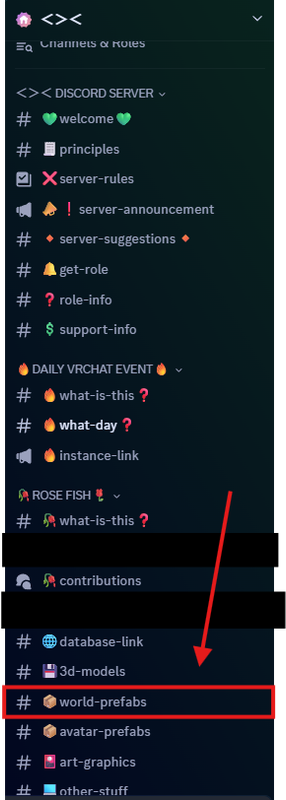
Above: VISUAL ON THE WORLD PREFABS CHANNEL
clicking on the world prefabs channel, downloading some cool stuff the <>< community has made, and dropping them into your world!
Now, once you've done with programming and adding the things you want into your world, we're gonna move onto the Testing and Optimizing Stage
In this stage make sure to test everything thoroughly, and under 10x the conditions to make sure that your world doesn't lag on older hardware or phones.
For example let's say you have an enemy AI in your world with a complicated script for it. Try spawning a 1000 or 2000 of them into your world(this is an over exaggeration but you can do this to test extreme situations), if your world lags then see how you can optimize your code or the world itself
A couple things you can do in your world is
- Turn all of the objects that you know wont move, static
- Enable Occlusion Culling
- Reduce the size of your textures(the default is 2048), if you want your texture to be pixelated over being blurry like a youtube video, then change the filter mode from Bilinear to Point(no filter)
And lastly, the
Lightning Stage!
There are 2 routes that you can take with the Lighting Stage: The Bakery Route, or the Unity Lighting System Route
The Lighting Route doesn't take too long to finish as you need to only configure a couple stuff then let your pc bake the lights.
Though it will take longer if you're particular about the kind of lighting you want to have.
And with that You are finished with the world!
Just upload your world and see how it looks! if it looks good, publish it to community labs and share it around with your friends, SNOW <><, and The <>< community!
If your world is meant to be submitted for CRYSTALL1ZED <><, then head over to the SN0W <>< discord server and submit your world at the CRYSTALL1ZED contributions channel!
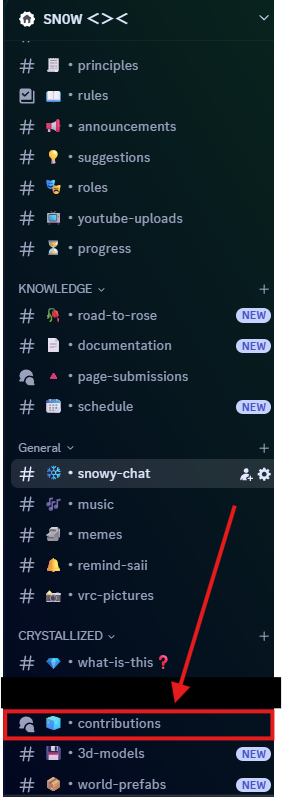
Above: VISUAL ON THE LOCATION OF THE CRYSTALL1ZED CONTRIBUTIONS CHANNEL
If your world is meant to be submitted for ROSE <>< , then go over to The <>< community Discord Server and submit your world at the ROSE FISH contributions channel!
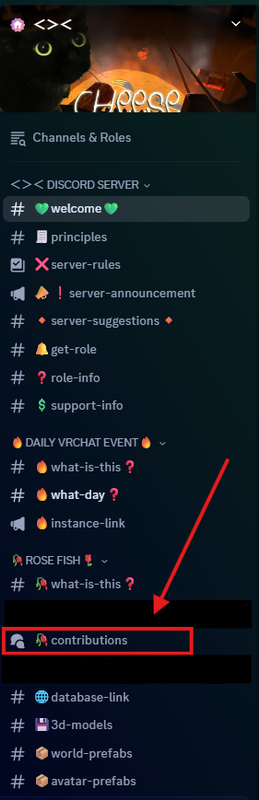
Above: VISUAL ON THE LOCATION OF THE ROSE CONTRIBUTIONS CHANNEL
This page was written by le Saii